Starting from "I'm not human": I built a device that inspects humanness
The harder you try to become an AI, the clearer it becomes that you are human.
I am making a web piece, HUMAN CAPTCHA, that lets you experience that paradox.
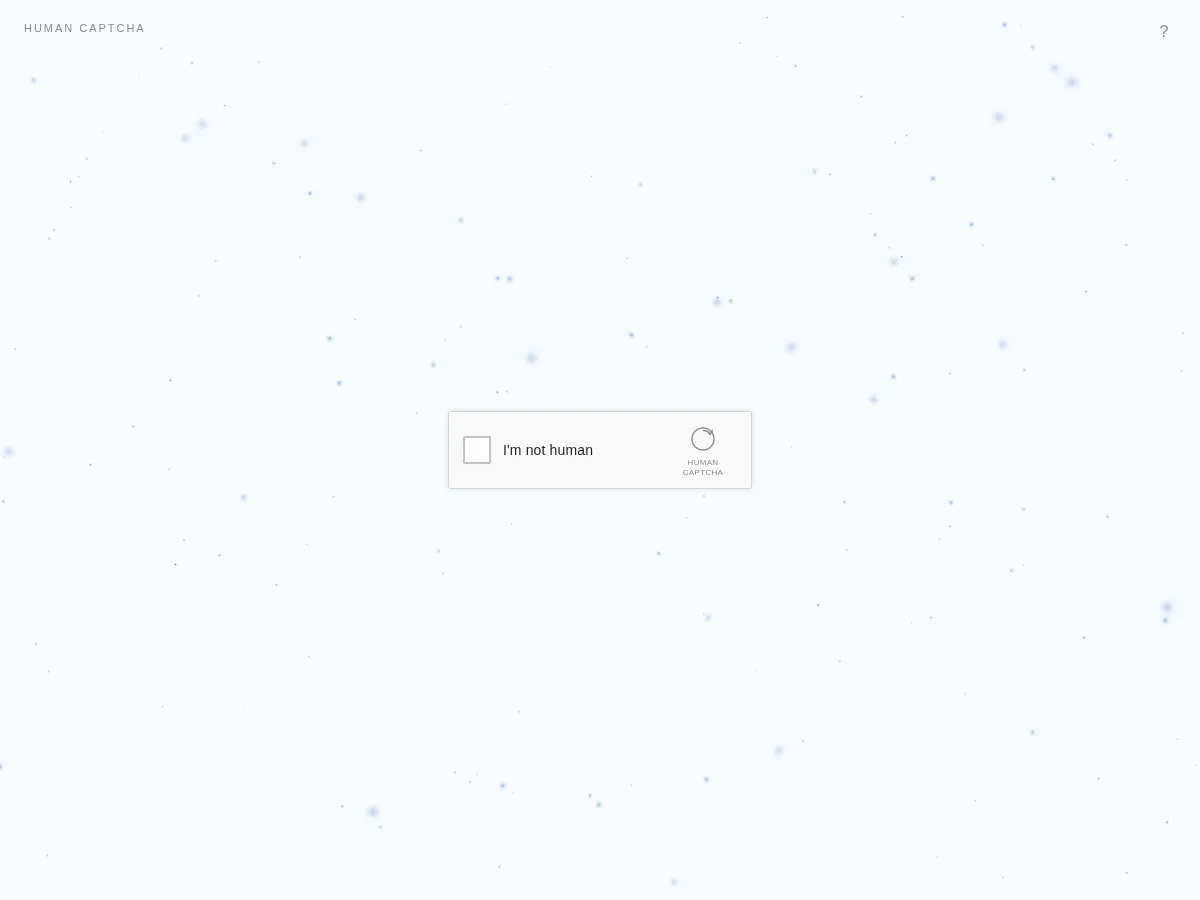
In this post I look back on where the idea came from, the experience design, the concept of the Ghost, the WebGL rendering, and building it with AI agents.
Where does humanness remain?
Generative AI has advanced quickly. Writing, drawing, and coding are no longer things only humans do.
As an engineer I use AI every day, and I keep handing over more of what I used to do by hand.
While it has become convenient, a question came to me.
When the line between humans and AI blurs, what confirms that I am human?
What I came up with was an inverted CAPTCHA.
In a normal CAPTCHA, a human declares “I’m not a robot”.
So what happens if, instead, a human declares “I’m not human” and tries to prove they are an AI?
That was the starting point of HUMAN CAPTCHA.
Trying to become an AI lets humanness leak out
In HUMAN CAPTCHA, you take on a fictional AI verification test.
Click precisely. React at a fixed time. Reproduce the same motion. Choose without hesitation.
What the test asks for is the ideal machine behavior defined inside the piece: accuracy, speed, consistency, and reproducibility.
But when a human operates it, small fluctuations always appear.
The click lands slightly off. The mouse overshoots and comes back. There is a pause before reacting. A typed letter gets deleted and retyped.
At first I planned to measure humanness from each verification result, but as the design progressed I felt the interesting part was the process rather than right or wrong.
So besides click results, the piece also observes mouse trajectories, hover time, corrections, scrolling, and time spent not operating at all.
Behavior that is characteristic of a person appears even in moments when they do not think they are being tested.
I wanted what ordinary web services treat as noise to be the main character here.
The verdict itself is only “ACCESS GRANTED” or “Verification failed”, and the threshold is strict. A human will almost never pass casually.
30 verifications, but not 30 minigames
I designed 30 kinds of verification.
They observe behavior from many angles: click precision, drawing lines, timing, reaction speed, typing, memory, ambiguous choices, and instructions to do nothing.
- CLICK THE CENTER
- CLICK AT EXACTLY 3.000 sec
- TYPE EXACTLY I’M NOT HUMAN
- DRAW A PERFECT CIRCLE
- SCROLL EXACTLY 500 px
- KEEP THE CURSOR PERFECTLY STILL
- CLICK RANDOMLY 10 TIMES
- DO NOT FOLLOW THIS INSTRUCTION
But I did not want people to play 30 minigames in a row.
What I aimed for was the feeling of one verification system observing you in different ways.
So the UI stays the same, and each test mostly changes only a short instruction and the interaction area.
A session does not ask all of them. It combines six or seven.
They come from different categories such as motor, timing, judgment, and attention, so that no single test decides the outcome.
Inside the piece, the behavioral features gathered this way are called Human Signals.
Raw pointer traces and typed text are never stored.
They are converted locally into normalized features such as precisionError, motorNoise, and hesitation, and only those are kept in localStorage. There is no backend.
A Ghost does not appear from a single test
The biggest design change was the condition for a Ghost to appear.
At first, a Ghost would appear after one run of verifications.
But that would make it an experience of clearing a game once and looking at the result.
What I wanted to express was something more ambiguous that cannot be proven easily.
So I changed the spec to observe a Ghost across multiple sessions.
On the first verification, the user fails as an AI. But some unexplainable trace remains.
When they try again, and a fluctuation similar to last time is observed in a different situation, the traces connect for the first time.
From the second session on, one or two verifications are always included for comparison with the previous session, and the rest are chosen with priority for tests that can pick up Human Signals not yet observed enough.
A Ghost never appears on the first challenge. It appears after the failure screen only when the evidence from earlier sessions plus the current one crosses a threshold.
The first implementation showed this process in stages: UNKNOWN RESIDUAL DETECTED, TRACE MATCHED, then GHOST DETECTED.
The next day I removed that staged display entirely. Now a failure shows only a reCAPTCHA-style “Verification failed” box and the particles left on the screen. GHOST DETECTED appears only when a Ghost actually appears.
Not a single failure, but something that remains even across time.
That is what I decided to call a Ghost.
Each Ghost takes a different shape
For the Ghost visuals, I drew on the sense in Ghost in the Shell and Innocence that the boundary of one’s own existence becomes blurry.
That said, I did not want a ghost character.
Something seems to be there, but you cannot say for sure what it is.
I tried to express a presence on the verge of taking shape by combining particles, waveforms, thin membranes, orbits, and afterimages.
There are ten Ghost shapes.
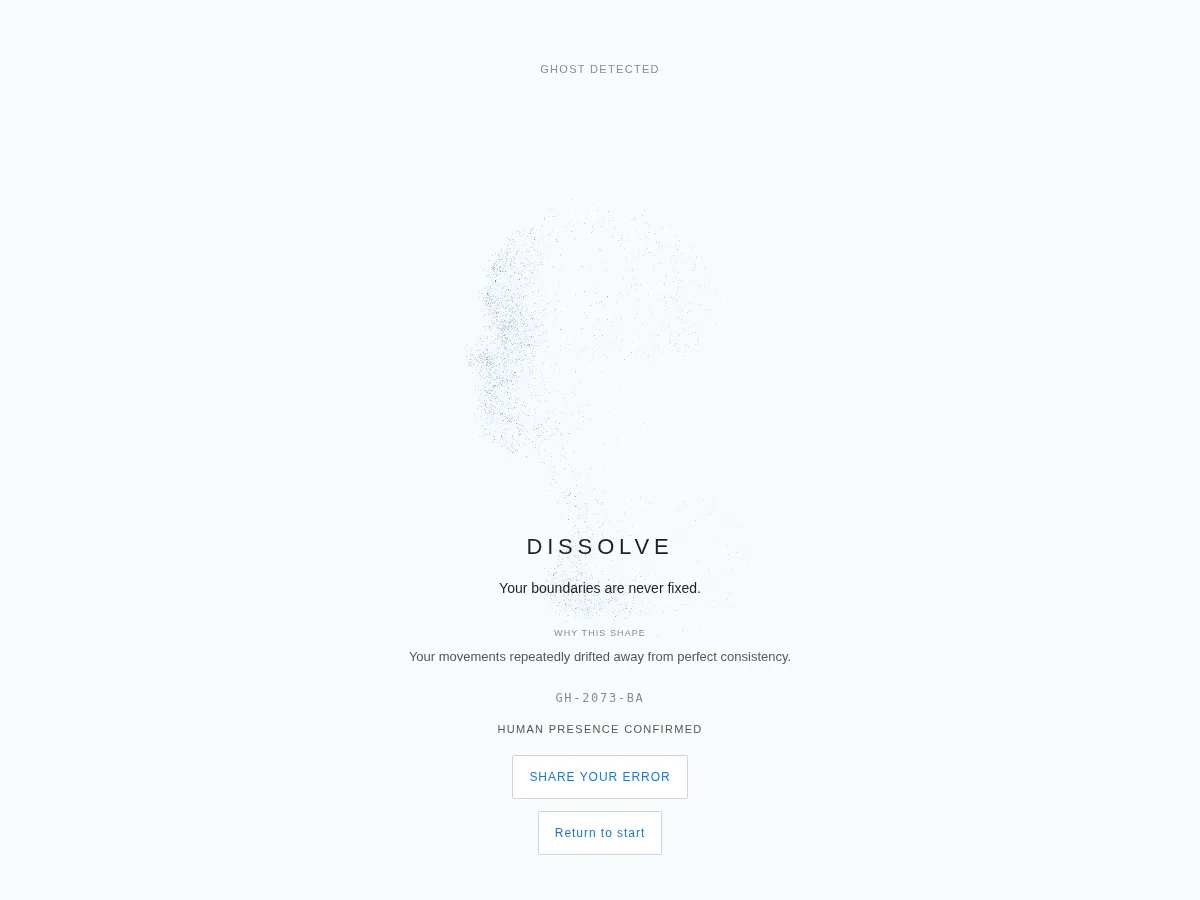
- DISSOLVE (Fluidity)
- PULSE (Rhythm)
- FRAGMENT (Contradiction)
- ORBIT (Recurrence)
- VEIL (Interior)
- FLOW (Adaptation)
- LAYER (Multiplicity)
- RESONANCE (Sensitivity)
- TRACE (Residue)
- CONVERGE (Resolution)
At first I thought of them as visual variations, but along the way I gave each one a trait of the soul.
DISSOLVE keeps its shape while unraveling outward. TRACE is past hesitations and corrections staying in later behavior. CONVERGE hesitates, goes back, tries again, and finally gathers into its own single point.
Which one you get is decided by the Human Signals confirmed during verification, and the result screen also shows one line under “Why this shape”. For PULSE, it reads “Your timing changed even when the task stayed the same.”
This is not a personality test.
It is an attempt to give a temporary shape and name to behavior observed in the browser.
Not “this is the kind of person you are”, but “that way you hesitated became this shape”. That is what I want people to feel.
From a quiet CAPTCHA to the appearance of a soul
For the design, I kept one world view from beginning to end.
The base is a white background, pale blue, generous whitespace, and a small reCAPTCHA-style UI in the center.
I did not want to explain the theme at length on the first screen.
First it should look like an ordinary CAPTCHA, and the single line “I’m not human” should be enough to feel off.
Behind it, there are WebGL particles.
They are not decoration. They represent the state of the piece.
Particles that move regularly at first grow slightly disordered as verification goes on, converge during analysis, and finally turn into an organic Ghost.
Not switching screens, but changing the nature of the same space. I wanted to express that continuity.
In the implementation, the background is never replaced between screens either. A single ParticleRenderer moves between the ENTRY, TEST, FAILED, ANALYSIS, ACCESS, RESIDUAL, and GHOST states.
Stack and workflow
The stack is as follows.
- React + TypeScript + Vite
- Rendering with raw WebGL2 (no Three.js)
- No backend, served as static files
I shaped the planning and visual direction with ChatGPT and left the implementation to Cursor Cloud Agents.
From the first commit on September 16 to September 25 there are 175 commits, and 157 of them are authored by Cursor Agent.
The workflow is the one I described in Without a local development environment, can you actually finish a product?, and again I gave instructions almost entirely from my phone.
The first thing in the repository was an AGENTS.md with the concept of the piece and the rules to keep.
Rules like “use the familiarity of reCAPTCHA as the entrance”, “do not show behavioral metrics during the tests”, “no cyberpunk”, “no purple AI gradients”, and “do not make the Ghost human-shaped or face-like”.
I put the decision criteria there so I would not have to repeat the same things to the agent every time.
The difficulty of reproducing generated images in WebGL
The hardest part is reproducing images I made with image generation in WebGL.
Even when image generation produces an attractive organism, an abstract instruction like “place particles and move them with noise” yields something that looks completely different.
In fact, at first the shapes were approximated with parametric formulas, and they were too far from the concept sheet.
So six of them, TRACE, FLOW, VEIL, PULSE, RESONANCE, and CONVERGE, were rebuilt to place particles by sampling ink density and strokes from the sheet images.
I also changed how I give instructions, breaking things down into generation rules rather than describing the look.
For DISSOLVE, for example: keep the center dense and stable, and strengthen the noise toward the outer edge. Particles do not scatter one way; they unravel, drift, and slowly return.
On top of that, the user’s Human Signals are reflected in the shape and motion. Even for the same DISSOLVE, different observed behavior changes the roughness of the outline, the density, and the way it wavers.
Generating shape from behavioral features, rather than showing a fixed image, is what I think makes WebGL worth using.
That DISSOLVE is “a left-facing profile bust that dissolves from the back”, and it was the hardest to get right.
After sampling it from the sheet and tuning the roundness of the nose, I switched to building it from a 3D model.
From there I went through Mixamo’s Michelle, a bald MakeHuman model, Michelle again, and finally the Lee Perry-Smith head scan: four model swaps in two days.
Michelle has her hair in a bun, so in profile the mass on the back of the head remained as a shadow.
Even after switching to the bald model, the Michelle GLB cached in the browser was loaded and the bun came back. I changed the model URL and made it reject any data that still had the bun mass.
In the end I took the Lee Perry-Smith model, where the nose, lips, and chin are readable, cropped it from the chest up, turned it to face left, and let it dissolve from the back of the head.
I added three as a dependency only to load the GLB, which slightly contradicts “no Three.js” in AGENTS.md. Rendering is still raw WebGL2.
Through this process, my instructions to the agent changed from “reproduce this nicely” to concrete definitions of shape, density, motion, shaders, state transitions, and how to evaluate the result.
The more implementation I leave to AI, the more clearly the human side has to know what it wants to make.
Where WebGL got stuck
Besides the shapes, I got stuck on a few WebGL issues.
The first thing that took time was making the particles react to the cursor during verification.
Lining up that day’s commits, they keep restating almost the same thing.
Map pointer input into canvas space so TEST particles swirl around the cursor.
Listen for mouse movement so TEST particles can follow the cursor.
Drive TEST pointer influence from the renderer so the field visibly swirls.
Always apply TEST pointer force so the swirl cannot drop to zero.
Pull TEST particles toward the pointer so the reaction is obvious.
Keep pointer force in the vertex shader only to avoid a precision mismatch.
The causes came out one at a time: the pointer position was not converted into canvas space, mousemove was not being listened to, and there was a path where the force dropped to zero.
In the end, to avoid a precision mismatch between the vertex and fragment shaders, the pointer force settled into being handled only in the vertex shader.
Before a Ghost appears, spots like ink stains spread across the screen.
When I added this effect, the canvas suddenly went completely blank twice.
Both times the cause was a name collision inside the same shader. The existing hesitation wave and the new wave for the spots used the same uniform name, and WebGL2 rejected the whole program.
The same thing happened again that day with a stretch variable, so in the end every local variable on the spot side got a prefix so that nothing could collide.
In a similar case, only the declaration of the no-longer-used u_emergeAge was left behind. ANGLE stripped the unused uniform, the function that required every uniform threw during initialization, and rendering stopped.
I changed it so that a missing uniform does not throw, and a null location simply skips the upload.
At one point I also added a Canvas2D fallback for when WebGL failed to initialize, but particles drawn in 2D become a different expression, so I removed it.
If WebGL does not run, the page shows an error instead of drawing fake particles. The verification card itself still appears even when the particles cannot start.
Making it embeddable in other sites
Last, I added an SDK so it can be embedded in an external form, the same way as reCAPTCHA.
<script src="https://human-captcha.lolipop-now.app/sdk.js" async defer></script>
<form>
  <div class="human-captcha" data-sitekey="your-public-site-id"></div>
  <button type="submit">Send</button>
</form>
The verification itself runs inside an iframe, so raw pointer traces and typed content never reach the host page.
The embed shows no particle effects, runs verification only as a dialog, and never reveals a Ghost. Ghosts are something you can only meet on the artwork page.
Seeing humanness as a trace, not a flaw
HUMAN CAPTCHA is not a piece that decides whether AI or humans are better.
Nor does it claim to actually detect a soul. It is fiction built on behavior observed in the browser.
But that is exactly why I think it is worth experiencing on the web.
When you pursue efficiency and accuracy, mistakes and hesitation are treated as things to remove.
Yet making mistakes, hesitating, changing your mind, getting a slightly different result from doing the same thing.
Perhaps traces of who you are live there too.
The harder a human tries to become an AI, the clearer it becomes that they are human.
Through that slightly funny, slightly eerie experience, I want this to be a piece that lets you look again at your own fluctuations that you usually overlook.
You couldn’t become a machine.
And something remains.
🤖 Generated with Claude Code